OSS in Magento: Charging the Correct EU VAT
Since July 2021, a simple but consequential rule has applied to European e-commerce: anyone selling beyond a threshold of EUR 10,000 to private customers in other EU countries owes VAT where the goods arrive — no longer at home. It sounds like red tape, but the One Stop Shop scheme keeps it manageable. The real work happens elsewhere anyway: in your shop. Because from the very first order it has to charge the correct rate.
What OSS is about
The EUR 10,000 limit is an EU-wide low-value threshold — it is not counted per country but across all your cross-border B2C sales (goods as well as digital services) combined. Below it, you may keep charging your domestic rate. Once you exceed it, the destination principle applies: the decisive rate is that of the country the goods are shipped to.
So that this does not turn into 26 separate tax registrations, the One Stop Shop (OSS) scheme bundles the reporting: you declare the VAT incurred elsewhere in the EU quarterly through a single point of contact at home — in Germany the Federal Central Tax Office — and pay it there collectively. An elegant simplification, but one with a prerequisite: your shop has to label every delivery country correctly.
Why the topic is picking up speed again in 2026
OSS has become routine — but the direction is clear: with the "VAT in the Digital Age" (ViDA) package adopted in 2025, the EU is extending the principle of central reporting. From 2028, a single VAT registration is set to cover more cases and spare merchants additional foreign registrations. Anyone who sets up their shop's tax logic cleanly today is already prepared for it.
Storing the correct rate in Magento
In most shops, tax rules and tax rates for the EU countries are already in place — for OSS you only need to review them and raise them to the respective country rate:
- In the admin, open Stores → Tax Rules.
- Edit the relevant tax rule — the assigned country rates are listed there together.
- Via Stores → Tax Zones and Rates, open the rate for the country in question.
- Replace the stored percentage (often still your domestic rate) with the valid rate of the destination country.
- Save and repeat for every EU country you ship to.
- Clear the cache and verify in the cart with a test delivery address.
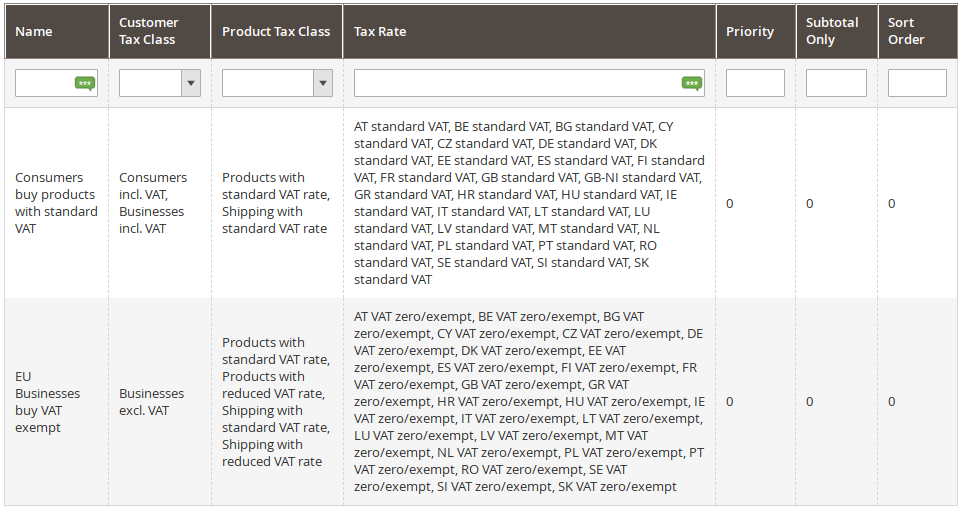
A worked example
Your shop is based in Germany and charges 19% domestically. Once you have crossed the EUR 10,000 threshold and ship to a consumer in France, the French standard rate of 20% applies. In Magento you store a tax rate for France at 20%, assign it to the tax rule — and Magento automatically picks the right rate based on the delivery address.
Rates change — don't maintain them by hand
VAT rates are adjusted, and they differ by product type (standard rate, reduced rate). A hard-coded table therefore goes stale quickly; the only reliable source is the European Commission's official one (online services and databases for taxation). And the more countries you ship to, the more error-prone manual upkeep becomes. This is where our extensions EU VAT Enhanced for Magento 2 and Scheduled Tax Rate Mass Updates come in: they keep many tax rates up to date centrally and automatically — scheduled to the effective date if needed.
Note: This article explains the technical setup in Magento and is not tax advice. For binding information, please consult your tax advisor or tax authority.
Post Comments
Be the first to share your thoughts on this post.
Submit Comment