VAT ID validation overview
All VAT ID validations that have been performed are stored in the vat_validation table and are available as a grid in the admin area. This lets you see in a traceable way which number was checked when and with what result, and you can revalidate or delete individual entries.
You can find the grid under Stores → Tax → VAT Numbers (action euvat/validation/index).
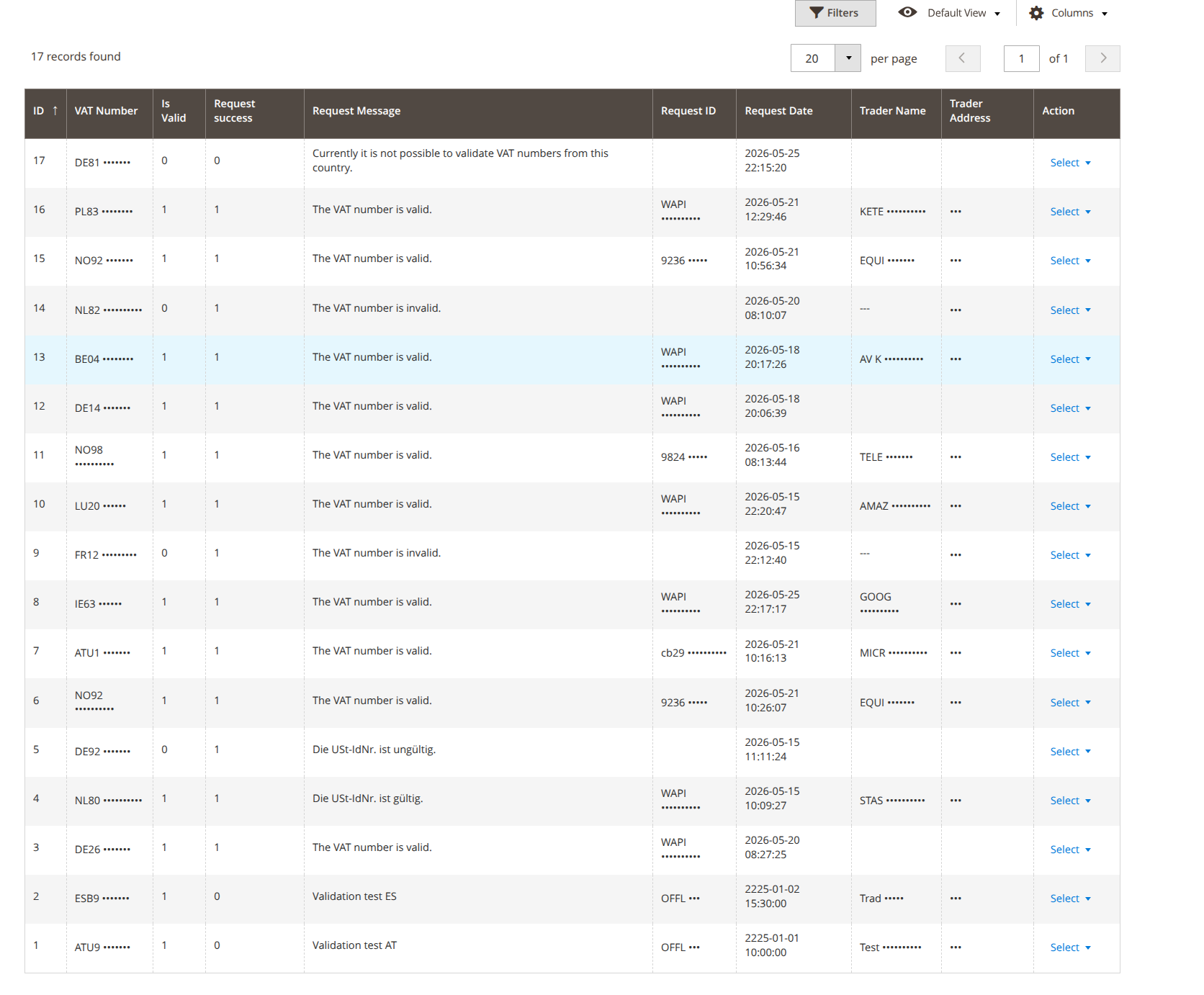
Columns
| Column | Content |
|---|---|
| ID | Internal record ID (validation_id). |
| VAT Number | The checked VAT ID (vat_id). |
| Is Valid | Result of the validity check (vat_is_valid). |
| Request success | Whether the request was technically successful (vat_request_success). |
| Request Message | Message from the interface (request_message). |
| Request ID | Request identifier from the interface (vat_request_id). |
| Request Date | Time of the check (vat_request_date, filterable as a date range). |
| Trader Name | Registered company name from the response (vat_trader_name). |
| Trader Address | Registered address from the response (vat_trader_address). |
All columns can be filtered and sorted; the view can be customized via bookmarks and the column controls.
Actions per row
- Revalidate – checks the number again via the interface and updates the record (action
euvat/validation/revalidate). - Delete – removes the entry from the cache; the next time it is used, the number is checked again (action
euvat/validation/delete).
Permissions (ACL)
Access is secured via dedicated ACL resources. Admin accounts without full rights need these permissions explicitly:
| Resource | Purpose |
|---|---|
Geissweb_Euvat::validation_list |
View the validation overview. |
Geissweb_Euvat::validation_usage |
(Re)validate numbers from the overview. |
Geissweb_Euvat::setup |
Run the setup routine. |
Geissweb_Euvat::config |
Configuration section of the extension. |