Tax Classes & Calculation
The heart of the extension: Instead of binding the tax class permanently to the customer group, the module derives it dynamically from the domestic country, the customer address, and the VAT ID. These settings are located under Stores → Configuration → (Sales) EU VAT Enhanced → VAT settings.
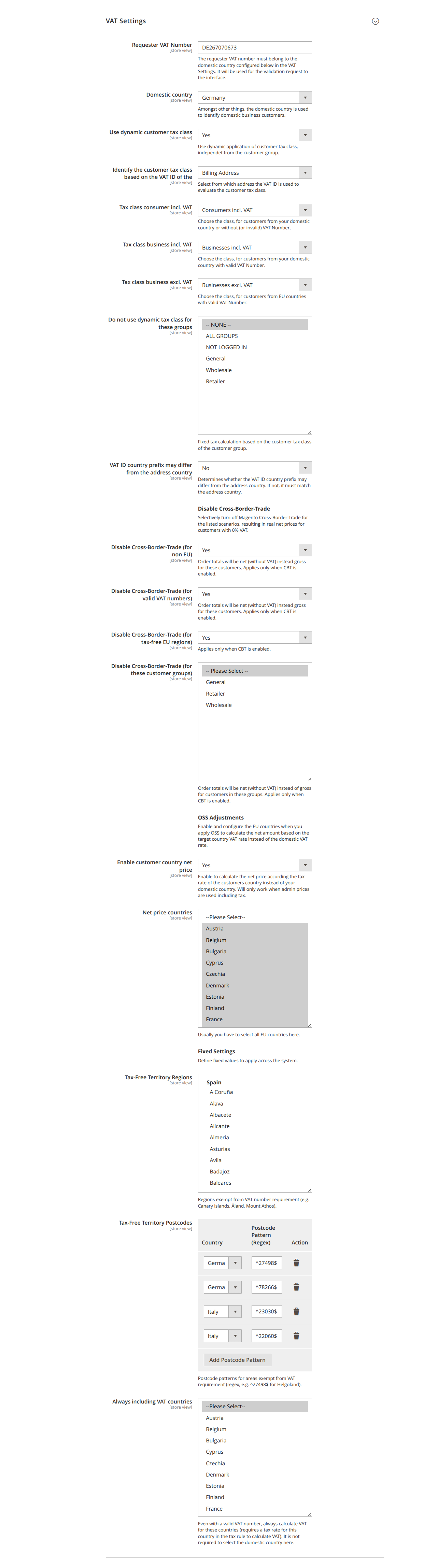
Basic settings
- Domestic country (
domestic_country): Your home/shipping country. Among other things, it serves to identify domestic business customers and is the reference point for all calculations. If no value is set, the country is taken from the store's address configuration. - Use dynamic customer tax class (
use_vat_calculation, default: Yes): Enables the dynamic assignment of the customer tax class independently of the customer group. This allows, in principle, all customers to shop tax-exempt as long as their VAT ID is valid and the country matches – without assignment to a special group. - Identify the customer tax class based on the VAT ID of the (
taxclass_identifier_method, default: billing address): Determines which address is used for evaluation – billing address (billing) or shipping address (shipping). The choice affects the supported scenarios (see Use Cases). Visible only when dynamic calculation is enabled.
The three dynamic tax classes
When dynamic calculation is enabled, the module assigns one of three customer tax classes depending on the scenario:
| Field | Application |
|---|---|
Tax class for consumers incl. VAT (tax_class_including_consumer) |
Address without VAT ID or with invalid VAT ID |
Tax class for businesses incl. VAT (tax_class_including_business) |
Valid VAT ID and country = domestic |
Tax class for businesses excl. VAT (tax_class_excluding_business) |
Valid VAT ID and country ≠ domestic (EU). Also applied to non-EU countries. |
Restricting the calculation specifically
-
Do not use the dynamic tax class for these groups (
fixed_taxcalc_groups): For the selected customer groups, a fixed calculation is performed based on the tax class of the customer group instead of dynamically. Visible only when dynamic calculation is enabled. -
Always include VAT (
always_vat_countries): For these countries, VAT is always calculated even with a valid VAT ID (requires a tax rate for the country in the tax rule). The domestic country does not need to be selected here. Visible only when dynamic calculation is enabled. -
VAT ID country prefix may differ from the address country (
allow_different_prefix, default: No): Determines whether the country prefix of the VAT ID may differ from the address country. When set to "No", the prefix must match the address country, otherwise VAT is calculated.
Disabling cross-border trade (CBT)
If your shop is aimed primarily at consumers, the admin prices are usually "incl. tax" and you have enabled Cross-Border-Trade (CBT) under Stores → Configuration → Tax. Business customers with a valid VAT ID then receive the gross price without the tax amount – not the true net price. With the following switches in the Disable Cross-Border-Trade section, you enforce true net prices. The switches only take effect if CBT is enabled in Magento.
- Disable Cross-Border-Trade (for non-EU countries) (
disable_cbt_noneu, default: Yes) - Disable Cross-Border-Trade (for valid VAT IDs) (
disable_cbt_eub2b, default: Yes) - Disable Cross-Border-Trade (for tax-free EU regions) (
disable_cbt_taxfree, default: Yes) – for tax-free EU regions (this field is not translated in the admin). - Disable Cross-Border-Trade (for these customer groups) (
disable_cbt_groups): For the selected groups, the totals are calculated net instead of gross.
OSS adjustment: net price by customer country
In the OSS Adjustments section: If you apply the OSS procedure, you calculate the net price based on the tax rate of the destination country instead of the domestic rate.
- Enable customer country net price (
vat_settings/threshold_enabled, default: No): Calculates the net price by the rate of the customer country instead of the domestic country. Works only when admin prices are maintained incl. tax. - Countries with net prices (
threshold_countries): Usually all EU countries. Store the respective rates for these countries underStores → Tax Zones and Rates. Visible only when customer country net price is enabled.
Tax-free territories
In the Fixed Settings section, you define tax-exempt areas:
- Tax-Free Territory Regions (
taxfree_regions) – tax-free territories (regions) - Tax-Free Territory Postcodes (
taxfree_postcodes) – tax-free territories (postcodes)
These two fields are not translated in the admin and appear there in English. They and the supplied default values (e.g. Canary Islands, Heligoland, Livigno) are described in detail under Special Regions.